Skip to content
ATS Mako
For recruiting agencies

Report like clients
never want to leave.

The exact deliverables to send agency clients, the cadence that keeps them confident, and how to automate every on-brand report from one platform.

30-day free trial. No setup fees, no long-term contracts.

The retention lever nobody bills for

Clients renew on what they can see

Most agencies obsess over speed to submit and forget the thing that actually decides renewals: whether the client can see the work between hires. Client reporting is not a courtesy. It is how a hiring manager decides you are worth the fee. Get the deliverables and the cadence right and you win the renewal long before it is due.

Reporting is how clients decide to renew

Clients rarely churn because you missed one hire. They churn because they cannot see the work between hires. A steady report answers the quiet question every hiring manager asks: is this agency actually moving my roles forward? When the answer is visible every week, the renewal conversation is already won.

Silence gets read as inactivity

If a client hears from you only when you present a candidate, the gaps feel like nothing is happening. A short, predictable update fills those gaps with proof. It turns a black box into a shared scoreboard and stops the anxious check-in emails that eat your recruiters day.

The right numbers reset unrealistic expectations

A client who thinks a niche role should fill in a week is a client who blames the agency. Reporting on your real pipeline, submittals, and market response reframes the conversation around evidence. You stop defending your speed and start managing expectations with data.

Consistent reports let you charge what you are worth

Agencies that report clearly compete on results, not price. When a client can see submittal-to-interview rates, time-to-fill, and pipeline depth on their own roles, your fee reads as an investment with a return, not a line item to negotiate down.

What to send

The six deliverables clients actually read

A recruiting report is not a data dump. It is six clear answers to the questions a client is already asking. Send these, in this order, and the update reads like management, not paperwork.

01

Pipeline snapshot by role

Open requisitions with candidates at each stage: sourced, contacted, screened, submitted, interviewing, offer. One glance tells the client which roles are healthy and which need a decision from their side.

02

Submittals and interview activity

Who you sent, when, and what happened next. Submittal counts, interview conversions, and any feedback still owed by the client. This is the section that proves the work and surfaces client-side bottlenecks.

03

Time-to-fill and time-in-stage

How long roles have been open and where candidates are getting stuck. Framed as trends, not guarantees, so the client sees momentum without you promising a fill date.

04

Market and response signals

Applicant volume, response rates, and what the talent market is telling you about pay, location, or requirements. This is where you advise, not just report, and where scope changes get justified.

05

Actions and decisions needed

A short list of what you need from the client this period: feedback on three candidates, a call on a salary band, a yes or no on an offer. Reporting that ends in asks moves roles faster than reporting that just describes.

06

Executive summary for the buyer

A two-line plain-language rollup for the person who signs the invoice. Roles filled, roles active, risks flagged. The recruiter reads the detail; the sponsor reads the summary.

How often

The right cadence for each deliverable

Not everything ships weekly. Match each deliverable to its natural rhythm so clients get momentum without inbox fatigue. Here is how a lagging cadence, a solid one, and an automated one compare.

Live pipeline access

The best agencies give clients a live view on the agency domain so status questions answer themselves. The scheduled report becomes a summary, not the only window in.

Lagging

Sent on request

Solid

Snapshot in every update

Automated

Always-on branded dashboard

Status and activity update

Weekly is the sweet spot for active searches. It is frequent enough to show momentum and rare enough to respect the client inbox. Automate it so it goes out on the same day every week without a recruiter rebuilding a deck.

Lagging

Monthly

Solid

Weekly

Automated

Weekly, auto-generated

Submittal notifications

Never make a client wait for the weekly report to learn you sent a strong candidate. Submittals are real-time. The weekly report then tallies them and flags any still waiting on feedback.

Lagging

Batched weekly

Solid

Same day

Automated

The moment you submit

Performance review

A monthly rollup shows time-to-fill and conversion trends across all roles. The quarterly review zooms out to fill rate, cost, and market advice, and is the natural home for the renewal conversation.

Lagging

At renewal only

Solid

Monthly

Automated

Monthly, with a quarterly deep-dive

Executive summary

The invoice signer will not read a five-page pipeline export. Give the sponsor a two-line summary on the cadence they care about, usually monthly, so they always know what they are paying for.

Lagging

Buried in the detail

Solid

Top of every report

Automated

Its own short recap to the sponsor

Anatomy of a report clients trust

Four things that separate a report from a status update

The difference between a report clients ignore and one they act on is not the volume of data. It is these four qualities, present in every good deliverable.

Clarity

It answers the client question first

The top line states where every role stands before any detail. A busy hiring manager should know in ten seconds whether their search is healthy, stalled, or waiting on them, without scrolling through a candidate export to find out.

Honesty

It reports trends, never guarantees

Time-to-fill and conversion rates are shown as directional history, framed as typical for these roles. You never promise a fill date. Honest framing builds the trust that survives a hard search and keeps the client through the slow month.

Brand

It looks like your agency, not a tool

Every report and portal carries your logo, colors, and domain. The client experiences your brand at every touch, which is exactly what a premium agency fee is supposed to buy and what a generic dashboard quietly undermines.

Action

It ends with what you need from them

A report that just describes activity is a status update. A report that closes with two or three decisions the client owes you is a management tool. The ask is what turns reporting from a courtesy into a lever that moves roles.

The playbook

Seven steps to client reporting that runs itself

From the kickoff contract to the quarterly review, here is how the fastest agencies turn reporting from a Friday scramble into an automated, on-brand system that scales desk to desk.

1

Agree the reporting contract before you start the search

In the kickoff, set what you will report, on what cadence, and to whom. Name the metrics that matter for these roles, agree that time-to-fill is a trend and not a promise, and confirm who receives the recruiter-level detail versus the executive summary. A reporting contract set on day one prevents the most common client complaint: not knowing what to expect.

2

Give every client a live, branded pipeline view

Stand up an on-brand view of the roles you own on your own domain, with your logo and colors, so the client sees your agency and not a generic tool. Your logo, your colors, your domain. When a hiring manager can check status themselves, the anxious where-are-we email disappears and your scheduled report becomes a highlight reel instead of a fire drill.

3

Wire sub-statuses to the numbers clients actually read

Connect sub-statuses directly to production reporting so pipeline stages roll up cleanly. Track first and second interview stages with office-level flexibility. When your stages map to the report, the weekly update writes itself from the work your recruiters already did, instead of from a spreadsheet someone rebuilds by hand every Friday.

4

Automate the weekly update so it never slips

Schedule the status report to send on the same day every week from one platform. Recruiters keep working the pipeline; the report assembles itself from live data. Set the trigger, and we handle the rest. Consistency is the whole point of a report, and consistency is exactly what manual, hand-built decks fail to deliver during a busy hiring week.

5

Push submittals and decisions in real time

The moment you submit a candidate, the client should know, not next Friday. Send the submittal on-brand and log it so the weekly report tallies it automatically. Pair it with a clear ask: review by a date, book an interview, decide on the offer. Reporting that ends in a decision request is what turns a slow client into a fast one.

6

Roll up monthly and go deep quarterly

Use smarter report tabs and cleaner navigation to build a monthly rollup of time-to-fill, submittal-to-interview, and pipeline depth across every role. Once a quarter, zoom out to fill rate, market advice, and the roles worth adjusting. The quarterly review is where scope changes get agreed and where the renewal is quietly earned.

7

Standardize the format so every client gets the same clean report

Lock a report template so a new recruiter, a new client, and a rushed week all produce the same on-brand deliverable. Update once, deploy everywhere. Standardization is what lets an agency scale from ten clients to a hundred without the reporting quality drifting desk to desk.

Note on metrics: report time-to-fill and conversion rates as trends typical for the role, not as guarantees. ATS Mako never promises a fill date or a placement, and neither should your client report.

Powered by ATS Mako

One platform. Every client report, on your brand.

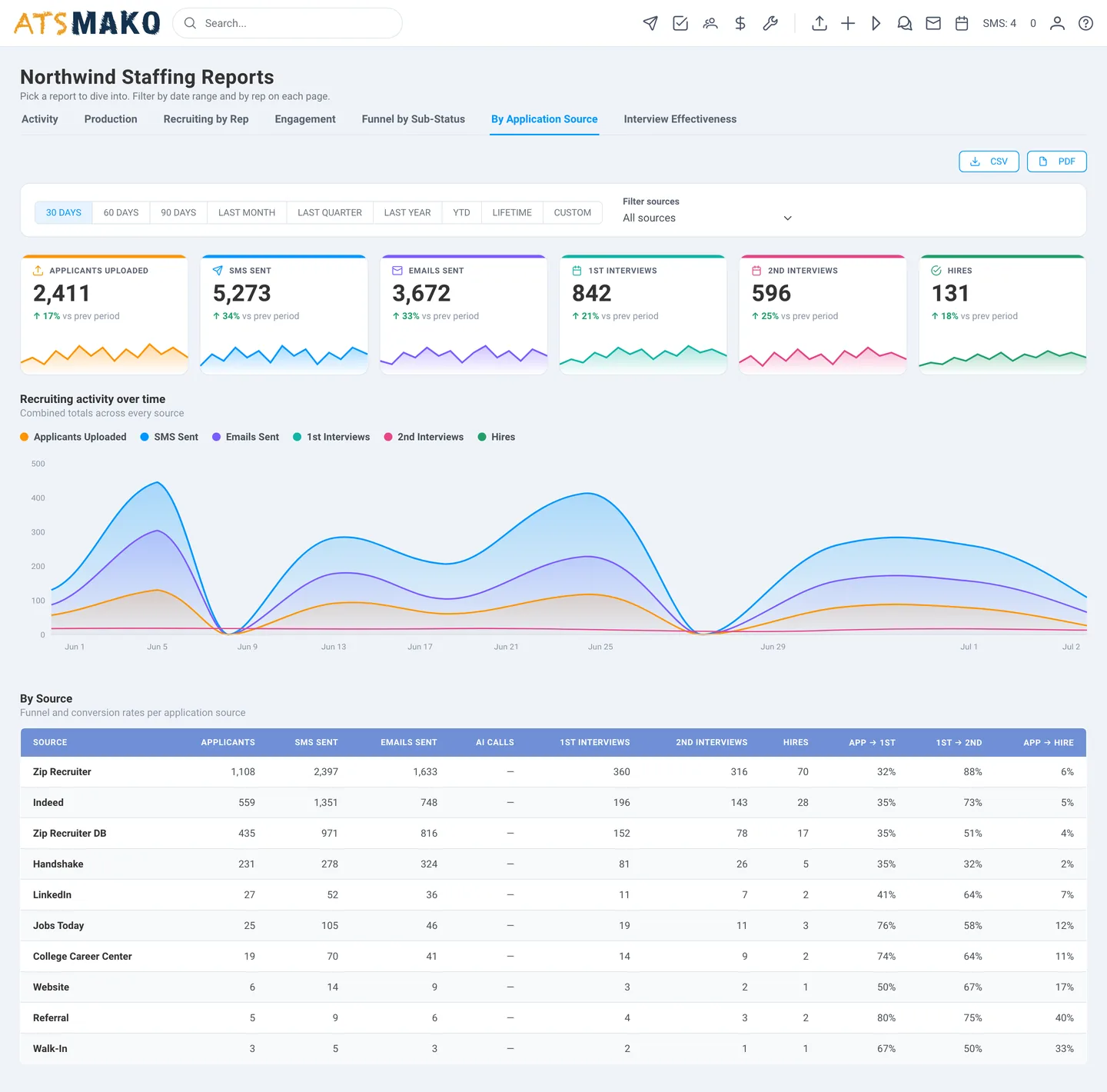
Nine logins, nine bills, and none of them talk to each other is how most agencies still run reporting: a spreadsheet here, a scheduler there, a deck rebuilt by hand every week. ATS Mako replaces that stack with one white-label platform where reporting is native, not bolted on.

  • Customized reporting with sub-statuses wired to production, first and second interview stages, and office-level configuration.
  • Smarter report tabs and cleaner navigation so recruiters find pipeline insight fast, not after an hour in a spreadsheet.
  • Your logo, your colors, your domain across every branded portal and report the client ever sees.
  • Locked templates so a new recruiter, a new client, and a busy week all ship the same clean deliverable. Update once, deploy everywhere.
ATS Mako customized reporting dashboard showing pipeline stages and time-to-fill trends
Questions agencies ask

Recruiting agency client reporting FAQ

How often should a recruiting agency report to clients?

For active searches, a weekly status update is the standard: frequent enough to show momentum, rare enough to respect the inbox. Submittals should go out the moment you send a candidate, not batched into the weekly report. Layer a monthly performance rollup on top for time-to-fill and conversion trends, and a quarterly deep-dive for fill rate, market advice, and the renewal conversation.

What should be in a recruiting agency client report?

The essentials are a pipeline snapshot by role, submittal and interview activity, time-to-fill and time-in-stage trends, market and response signals, a short list of decisions you need from the client, and a two-line executive summary for the person who signs the invoice. Lead with where every role stands, then support it with the detail.

Should clients get a live dashboard or a scheduled report?

Both. A live, branded view lets clients answer their own status questions any time, which cuts the anxious check-in emails. The scheduled weekly report then becomes a summary and a set of asks rather than the only window into your work. Together they show consistency and give the client control.

Can I automate client reports so recruiters do not build them by hand?

Yes. When your pipeline stages and sub-statuses are wired to reporting, the report assembles itself from the live data your recruiters already produce. ATS Mako lets you connect sub-statuses to production reporting and schedule updates, so the same clean report goes out on the same day every week without anyone rebuilding a deck.

How do I report metrics without promising a fill date?

Frame every number as a trend or a typical range, not a commitment. Show time-to-fill as history across similar roles, show conversion as a directional rate, and pair market signals with advice. You report evidence and manage expectations; you never guarantee a hiring outcome or a placement date.

How does client reporting help agency retention?

Clients renew when they can see the work between hires. Consistent, on-brand reporting fills the quiet gaps with proof, resets unrealistic expectations with data, and makes your fee read as an investment with a visible return. The agencies that report clearly compete on results instead of price.

Stop guessing. Start knowing.

Give every client a report they trust

Wire your pipeline to reporting, brand every touch as your agency, and let the weekly update send itself. See how ATS Mako makes client reporting automatic and on-brand.

Designed for speed. Built for scale.