
Native AI: AI Phone Screening for Applicants
An AI voice agent calls the applicants you choose, only inside permitted hours, asks your qualifying questions, and records an outcome, a summary, a transcript, and the call itself.
- the call outcomes, each decided by ATS Mako's own rules
- Only
- outer calling limit, on the applicant's own clock
- 8 AM to 9 PM
- billed only for connected time, with the charge shown on every call
- Cost-efficient
- qualifying questions per agent
- 1 to 15
AI voice agents phone-screen your applicants and write the result back to the profile.
Native AI is ATS Mako's AI phone-screening feature. An AI voice agent calls the applicants you choose, only during permitted hours, introduces itself as an AI assistant, asks your qualifying questions, and records what happened: an outcome, a written summary, a word-for-word transcript, and a recording of the call. You decide the agent's voice and questions, who is called, when, and how many times. Results appear in the Calls and Analytics tabs and on each applicant's profile.
At a glance
- What it does
- Phones applicants automatically, asks your qualifying questions, decides an outcome for every call, and writes the result back to the applicant.
- Where to find it
- HR › Applicants › Native AI, right after Integrated Auto Dialer. Six tabs: Campaigns, Agents, Calls, Analytics, Do Not Call, and Settings.
- Who can use it
- Users with the Native AI permission. It is off by default, and office admins need it too. Your office's phone provider must be one that Native AI supports.
- What it costs
- Cost-efficient: prepaid credits, billed only for connected time, plus a one-time purchase for each AI calling number. A call that never connects costs nothing, and every price is shown before you confirm.
- Good to know
- A new office starts with AI calling off. An office admin switches it on once four required setup steps are done.
Why recruiters care
- The agent phones the applicants in your audience and asks every one of them the same questions in the same order.
- Open an applicant and see what happened: the outcome, a summary, each question with the answer, and a Play button for the recording.
- Know who needs a person. Applicants who ask to speak with one are marked “Recruiter requested”, and the campaign owner gets a bell item and an email.
- Qualified and Not qualified calls move the applicant to the sub-status you chose, which triggers any automated emails or SMS you set up for that sub-status.
Why leaders care
- Every call leaves a full record: timeline, answers, an AI-written summary, a transcript, a recording, and the reason the outcome was chosen.
- ATS Mako's own rules decide each outcome. The AI only listens and records the answers.
- Cost-efficient by design: prepaid credits, billed only for connected time, with the charge shown on every call.
- Safeguards are built in: a calling window on the applicant's own clock, a shared Do Not Call register, and a fixed AI and recording disclosure at the start of every call.
One applicant, one call, six steps.
Here is what happens to a single applicant once a campaign is running.
- 1
Enrolled
Every applicant who matches the audience is enrolled. If “Enroll new matches” is on, later matches are enrolled within 15 minutes.
- 2
Checked before every call
ATS Mako re-checks that the campaign is active and not held, the applicant is not on the Do Not Call register, it is inside calling hours on the applicant's clock, the daily limit is not reached, and you have credits and a free AI calling number. If a check fails, the applicant waits and no attempt is used.
- 3
The call
The agent phones from one of your AI calling numbers. Its first words are always the same: its name, that it is an AI assistant, which office it calls for, why, and that the call is recorded. Then it asks your questions in order.
- 4
The outcome
ATS Mako's own rules choose one of eleven outcomes, such as Qualified, Not qualified, or Voicemail. The summary, transcript, and recording are saved in the call record.
- 5
Written back
After any call where someone spoke, a note is added to the applicant. A Qualified or Not qualified result also moves the applicant to the sub-status you chose for the agent.
- 6
Next attempt, or finished
A final outcome ends the applicant's part in the campaign. Otherwise the next attempt is booked, until attempts run out and the applicant is marked Unreached.
Your agent, your questions.
An agent is the AI voice that calls applicants. You choose its name, role, and voice, write the qualifying questions it asks, and decide what happens to the applicant after the call.
- Name and role are spoken at the start of every call, so write the role the way it should sound, for example “a recruiting assistant”.
- Pick a voice by playing a sample. Filter by All, Female, Male, or Neutral, or search by name or accent.
- Add 1 to 15 questions in the order you set. Each has an answer type (Yes / No, Number, Choice from a list, or Free text) and an optional rule such as Must be Yes or At least. A question marked “Required to qualify” must be answered and meet its rule for the call to be Qualified.
- Add up to 2,000 characters of facts the agent may share, such as pay, schedule, and location. It answers job questions only from that text, and anything else gets “a recruiter will follow up”.
Hear it before applicants do.
Press Test call on a Ready agent and it phones a number you can answer. It greets you by your first name and talks about “a sample position”, so you hear the voice, the greeting, and the questions exactly as an applicant would.
- Type your own mobile number, confirm “Call … now?”, and press “Place the test call”.
- Open the result in Calls to read the outcome, answers, summary, transcript, and recording.
- Test calls are hidden in Calls unless you tick “Include test calls”, are never counted in Analytics, and never change an applicant. Only US numbers can be called.
Every call leaves a record.
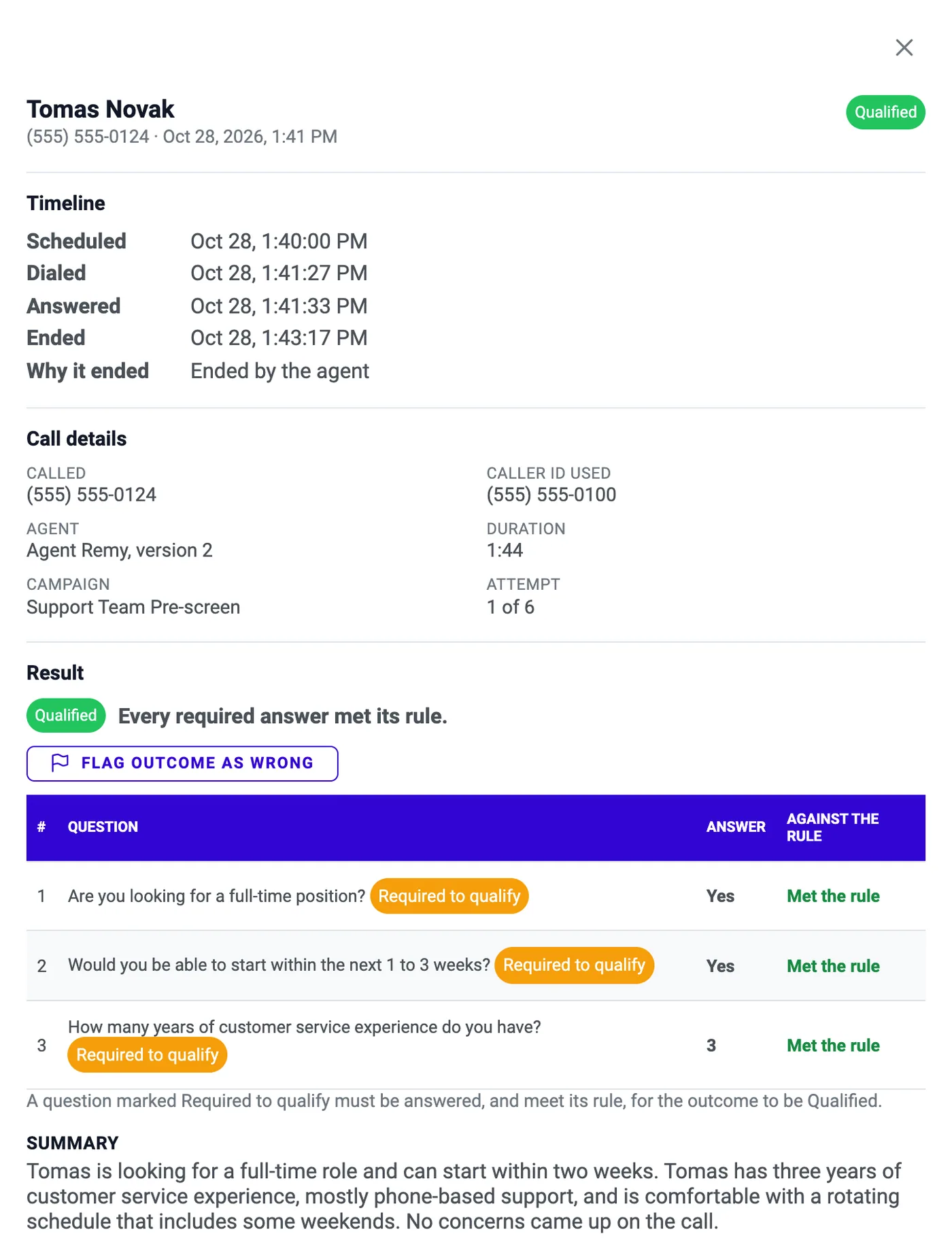
Click any call to open its record in a side panel. You see the timeline, the number called, the agent and its version, each question with the applicant's answer and whether it met the rule, an AI-written summary, a word-for-word transcript, and the recording.
- The Result section shows the outcome and the reason that decided it, for example “Every required answer met its rule.”
- Numbers shaped like a Social Security or card number are masked as “[masked]” in the transcript.
- Play the recording in the page. ATS Mako streams it to signed-in users, and there is no public link.
- If an outcome looks wrong, press “Flag outcome as wrong” and say why. The flag does not change the outcome, sub-status, notes, or charge, and flags are counted in Analytics.
The result is on the profile, not buried in a tool.
A recruiter who opens the applicant sees what happened without opening Native AI. In the applicant's panel, Engagement has an AI Calls tab after SMS, Voice, and Email.
- A note is added in the campaign owner's name after every call where someone spoke: outcome, agent, attempt, length, summary, each question and answer, and a link to the call record. Voicemail, No answer, Busy, and Failed add no note.
- Qualified sets the agent's Qualified sub-status and Not qualified sets its Not qualified sub-status. An applicant who is never reached gets the campaign's Unreached sub-status. The change is labelled “via Native AI” in the activity log and triggers any automated emails or SMS you set up for that sub-status.
- The AI Calls tab shows current enrollments (attempts used, the next attempt, and why it waits) and every Native AI call with its outcome, duration, summary, a Play button, and Open call for the full record and transcript.
- The sub-status is left alone when a change is not safe: the applicant's status is not Applicant or Holding, a person changed the sub-status after enrollment, the campaign was deleted or has no owner, or the target sub-status no longer exists. The call record then says “Not applied” and gives the reason.
One register, checked before every dial.
The Do Not Call register is one list for the whole office, shared with the Integrated Auto Dialer. A number on it is never called by Native AI or dialed by the Integrated Auto Dialer, whichever added it.
- It is checked when applicants are counted and enrolled, and again just before every call.
- When an AI call ends as Do not call, the number is added automatically, with the feature that added it and a note.
- Anyone with Native AI can add a number (10 digits and an optional note) and search by number or note.
- Only an office admin can take a number off, and only when the person has asked to be called again. Nothing is deleted: the record keeps who lifted it and when.
Every call ends in one clear outcome.
The AI only listens and records the answers. ATS Mako's own rules choose the outcome, using the first rule that applies: the carrier's result, an answering machine or silence, an opt-out, a wrong person, a callback request, a request for a person or a language problem, and then the answers against your rules.
| Outcome | What it means | What happens next |
|---|---|---|
| Qualified | Every required answer met its rule (or, if no question has a rule, the applicant is interested). | Ends the applicant's part. The agent's Qualified sub-status is set. |
| Not qualified | A required answer failed its rule, or the applicant is not interested. | Ends. The agent's Not qualified sub-status is set. |
| Recruiter requested | The applicant asked to speak to a person, or could not continue in English. | Ends. The campaign owner gets a bell item and an email to follow up. |
| Do not call | The applicant asked not to be called again. | Ends. The number joins the Do Not Call register at once. |
| Wrong number | The person who answered does not know the applicant. | Ends. The phone is marked wrong, so no campaign calls it until it changes. |
| Call back later | Someone else answered, or the applicant asked to be called at another time. | Uses an attempt. The campaign continues. |
| Undetermined | A conversation happened but the rules could not decide (for example, the call ended too early). | Uses an attempt. The campaign continues. |
| Voicemail | An answering machine, recording, call screen, or menu, or nobody spoke. No message is left. | Uses an attempt. The campaign continues. |
| No answer | The carrier reported that the call rang unanswered. | Uses an attempt. The campaign continues. |
| Busy | The carrier reported that the line was busy. | Uses an attempt. The campaign continues. |
| Failed | The call could not be placed, or no result ever arrived. | A call that went out uses an attempt. One that never left ATS Mako does not, and is retried. |
What you pay for, and when.
Native AI runs on prepaid credits and AI calling numbers you buy yourself. Usage rates can change, so the price is always shown on Settings › Credits before you buy.
| Item | How it is priced | Good to know |
|---|---|---|
| Call minutes | Per started minute of connected time, at the rate shown on Settings › Credits. | Connected time is rounded up to whole minutes: 1 or 60 seconds is 1 minute, 61 seconds is 2. A call that never connects (busy, no answer, could not be placed) costs nothing. Voicemail is billed for the time it was connected. |
| Credits | Prepaid, in Starter, Growth, and Enterprise packs. Growth is preselected and marked Popular. You receive exactly the dollar value you pay for. | Nothing is charged until you read the “Charge … to the card on file?” prompt and confirm. The balance rises at once, and every purchase is an invoice in My Account › Billing. Paying by bank debit adds the credits once the payment clears. |
| AI calling number | A one-time purchase on your card on file, priced before you confirm. Choose a number in an area code or any US local number. | Each number carries one call at a time, so the calls you can run at once equal your active numbers. Availability is checked before you are charged. Numbers are sold only against a card, not a bank debit. Releasing a number is permanent and the purchase price is not refunded. |
| Callbacks | Free. | If an applicant dials an AI calling number back, the call is forwarded to your call forwarding number and appears in Calls as an Inbound callback. It has no outcome, transcript, or recording and costs nothing. |
| Most one call can cost | The agent's maximum call length times the per-minute rate, so the most any call can cost is capped and known up front. | A call starts only if the balance covers that plus the maximum of every call in progress. A call that runs a few seconds past its limit can bill one extra minute. |
Everything in Native AI Phone Screening.
Agents you design
Give the agent a name, a role, and a voice you have heard. Write 1 to 15 qualifying questions, an optional opening line, and up to 2,000 characters of facts it may share.
Test calls before applicants
Press Test call on a Ready agent and it phones your own mobile. Hear the greeting, the questions, and the voice, then read the outcome and transcript in Calls.
Eleven outcomes, decided by rules
Qualified, Not qualified, Recruiter requested, Do not call, Wrong number, Call back later, Undetermined, Voicemail, No answer, Busy, and Failed. ATS Mako's rules choose, not the AI.
A complete call record
Timeline, call details, each question with the answer and whether it met the rule, an AI-written summary, a transcript, and a recording you can play in the page.
Written back to the profile
A note after every call where someone spoke, a sub-status change for Qualified and Not qualified, and an AI Calls tab in the applicant's panel.
Prepaid credits and your own numbers
Prepaid credits are billed only for connected time, and each AI calling number is a one-time purchase, so Native AI stays cost-efficient and easy to control. Every price is shown before you confirm.
Rules that run on every call.
These safeguards are part of how Native AI works. They help you stay inside the rules, and they are not legal advice.
Calling hours on the applicant's clock
Never before 8:00 AM or after 9:00 PM where the applicant is. Their time zone comes from their ZIP code, then their state, then the phone's area code, and finally your office's time zone. You can narrow the window, never widen it, and blackout dates and calling days are respected.
A shared Do Not Call register
Checked when applicants are counted and enrolled, and again before every dial. An applicant who asks not to be called again ends the call, and the number joins the register at once.
Disclosure at the start of every call
A fixed greeting names the AI, the office, and the reason for the call, and says the call is recorded. It cannot be edited, shortened, or interrupted.
Fixed conduct, no voicemail messages
The agent never leaves a voicemail message. If someone else answers it asks no questions and offers to call back, and it never promises a job, interview, pay, or start date. It ends politely if the applicant is abusive.
Warnings on sensitive questions
While you write questions, ATS Mako warns about protected characteristics (age, race or ethnicity, religion, national origin or citizenship, sex, gender or family status, disability or health, pregnancy, genetic information) and about requests for Social Security numbers, bank or card details, medical history, or government ID, which the agent never collects. The check looks for key words and never blocks a save.
An audit log nobody can edit
Office admins can read every compliance-relevant action, newest first: who did it, when, and the values before and after. Entries cannot be edited or deleted, and phone numbers show only their last four digits.
Rules and limits at a glance.
What Native AI does, and what it deliberately does not.
You are still responsible.
These safeguards help you stay inside the rules, but the rules that apply to your calls and recordings are yours to follow. Review your questions, hours, and scripts with your own legal adviser.
- Language and numbers
- English only. US phone numbers only, never premium-rate numbers.
- Calling window
- No earlier than 8:00 AM and no later than 9:00 PM on the applicant's clock. The default is 9:00 AM to 9:00 PM, Monday to Friday.
- Voicemail
- No message is ever left.
- Questions per agent
- 1 to 15, in the order you set. Question text up to 500 characters. A Choice question takes 2 to 10 choices of up to 60 characters.
- Agent text
- Name and role up to 255 characters each, opening line up to 300, facts the agent may share up to 2,000.
- Call length
- Maximum call length 1 to 30 minutes (default 10). Silence timeout 1 to 30 seconds (default 7).
- Cost
- Prepaid credits, billed per started minute of connected time. Calls that never connect are free, and current rates are always shown on Settings › Credits before you buy.
- To switch AI calling on
- Credit for at least 10 minutes of calling. The low-balance alert is adjustable and defaults to the cost of 60 minutes of calling.
- AI calling numbers
- Separate from your SMS number and the Integrated Auto Dialer's numbers. Each one carries a single call at a time.
- Integrated Auto Dialer overlap
- The Integrated Auto Dialer and Native AI never reach one person at the same time. After a connected AI call, that applicant's number stays off-limits for 10 minutes.
- Recordings and transcripts
- No expiry. They are removed when the applicant is deleted, and recordings are streamed to signed-in users only.
- Permission
- Off by default. Anyone with it can see every campaign and call, and can buy credits and numbers.
From busywork to a hiring engine.
The old way
- Recruiters phone each new applicant by hand to ask the same first questions.
- Call notes are typed up after the fact and read differently from one recruiter to the next.
- Opt-outs, wrong numbers, and callback requests are tracked by hand.
With ATS Mako
- An agent phones the audience you choose, inside permitted hours, and asks your questions in order.
- Every call has an outcome, a summary, a transcript, and a recording, and a note is added to the applicant.
- A request not to be called adds the number to the shared Do Not Call register at once.
Related features
Native AI Phone Screening FAQ
Does the agent say it is an AI?
Yes, on every call. Every call starts with the same fixed greeting: the agent's name, that it is an AI assistant, which office it calls for, why, and that the call is recorded. The greeting cannot be edited, shortened, or interrupted. The agent speaks English only. If an applicant needs a person or cannot continue in English, the call ends with “a recruiter will call” and the outcome Recruiter requested.
What does it cost?
Native AI is built to be cost-efficient: you pay for conversations, not for dials that go nowhere. Credits are prepaid and calls are billed per started minute of connected time, so a call that never connects costs nothing, and voicemail is billed for the time it was connected. Each AI calling number is a one-time purchase on your card on file. Current rates are always shown on Settings › Credits, and every price is shown before you confirm.
Who decides the outcome, the AI or ATS Mako?
ATS Mako. The AI only listens and records the answers. ATS Mako's own rules choose one of eleven outcomes from what was said and the rules you set on each question. If an outcome looks wrong, press “Flag outcome as wrong” and correct the applicant yourself. The agent judges from what the applicant says whether they asked not to be called again, so review any Do not call outcome that looks mistaken with your admin.
Does it leave voicemail messages?
No. If an answering machine, recording, call screen, or menu picks up, or nobody speaks, the call is recorded as Voicemail and no message is left. It uses one of the applicant's attempts and is billed for the time it was connected.
Which applicants and languages can it call?
US phone numbers only (never premium-rate numbers), in English only. Applicants who are Blocked, Duplicate, or Rejected are left out by default. Calls happen only between 8:00 AM and 9:00 PM on the applicant's own clock, and you can narrow that window but never widen it.
Who can use Native AI, and what is needed to switch it on?
Users with the Native AI permission (Admin › Configuration › Users, under Communication). It is off by default, and being an office admin is not enough: admins need it too. Your office's phone provider must also be one that Native AI supports. A new office starts with AI calling off, and an office admin switches it on once four required setup steps are done. Anyone with the permission can buy credits and numbers on your card on file, so give it only to people you trust with that.
Does Native AI keep my calling within the law?
It builds in safeguards that help, but it cannot promise that. The rules that apply to your calls and recordings are yours to follow. Review your questions, hours, and scripts with your own legal adviser.
Build a faster, smarter hiring engine.
Start your 30-day free trial — no setup fees, no contracts. Or see ATS Mako in action.
30-day free trial · No setup fees · No long-term contracts