
Roles & Permissions
Give everyone the right access — and nothing more. Granular role-based permissions control what each recruiter, manager, and office can see and do.
Give every recruiter exactly the access they need, and not one click more.
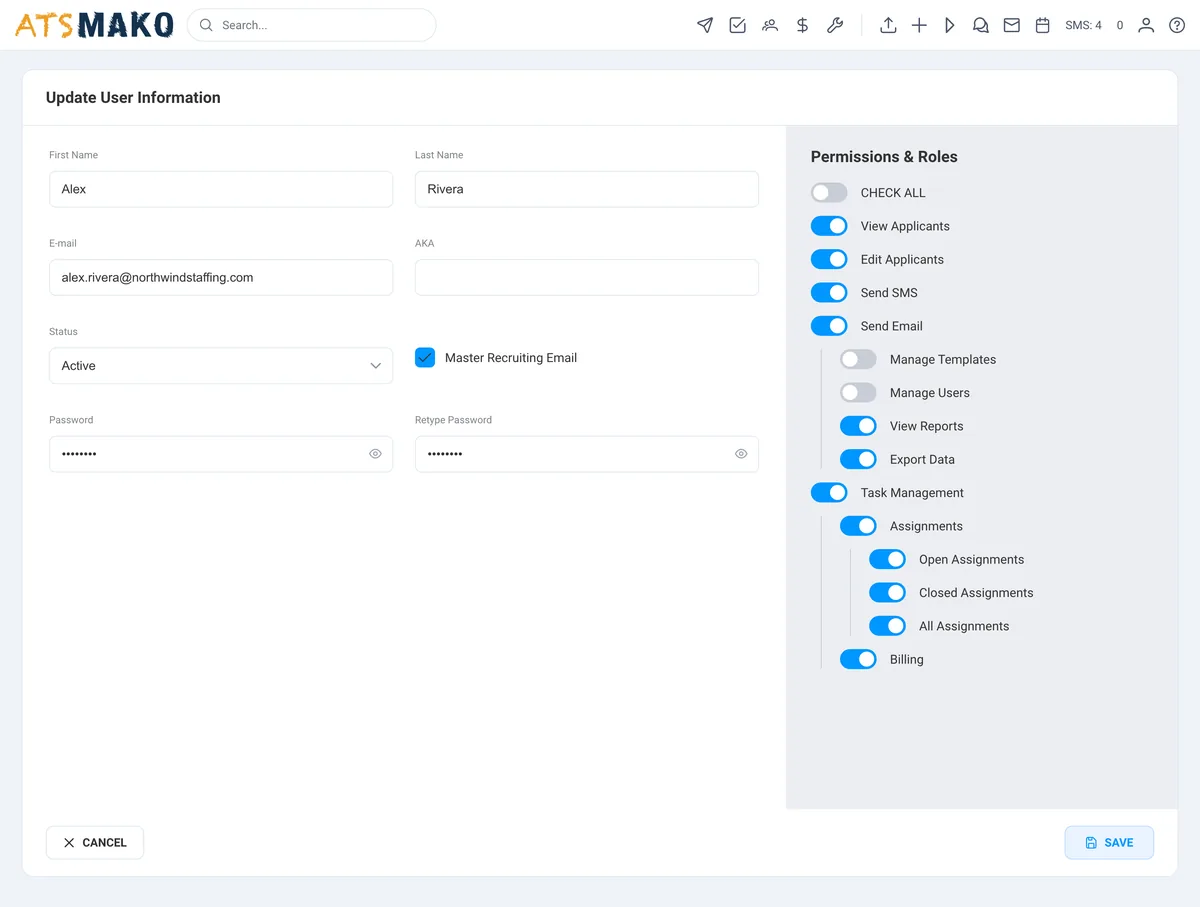
Roles & Permissions is the recruiting access control layer of ATS Mako. It gives you granular, per-user permissions and built-in roles, recruiter, admin, and super-admin, that define exactly what each person and each office can see and do. It's role-based access control built for multi-office and enterprise recruiting teams that need tight control without slowing anyone down.
Why recruiters care
- See your desk, not the whole company. Permissions keep your view clean so you work your candidates, not someone else's noise.
- No more accidental edits to records that aren't yours. Access boundaries mean fewer mistakes and less cleanup.
- Right access, day one. New recruiters get the recruiter role and start working immediately, no waiting on a custom setup.
- Move fast inside your lane. You get everything your role needs to source, message, and move candidates, and nothing that gets in the way.
Why HR leaders care
- Control exactly who touches what. Granular per-user permissions and clear roles, recruiter, admin, super-admin, mean access maps to responsibility, not to chance.
- Wall off offices that should stay separate. Per-office controls keep each location's pipeline private while leadership keeps the full view.
- Scale without losing the reins. Whether it's three recruiters or thirty across multiple offices, you set the rules once and they hold.
- Tighten oversight on sensitive data. You decide who can see, edit, and manage candidate records, so the right eyes are on the right information.
From busywork to a hiring engine.
The old way
- Everyone can see everything. One shared login, zero boundaries, and no way to tell who changed what.
- Offices step on each other's pipelines because there's no wall between locations.
- Onboarding a new recruiter means hand-configuring access from scratch every single time.
With ATS Mako
- Granular per-user permissions decide exactly who sees and does what, down to the individual.
- Per-office controls keep each location's data in its own lane while leadership sees the whole board.
- Assign a role, recruiter, admin, or super-admin, and the new hire is set up and working in seconds.
Everything in Roles & Permissions.
Granular Per-User Permissions
Control access at the individual level. Decide exactly what each user can see, edit, and manage, so access lines up with responsibility instead of being all-or-nothing.
Built-In Roles
Recruiter, admin, and super-admin roles cover the way real teams run. Assign a role and the right access comes with it, no custom build required.
Per-Office Access Control
Keep each office in its own lane. Control what every location can see and do, so pipelines stay private where they should and visible where leadership needs them.
Super-Admin Oversight
Give leadership the keys without handing them to everyone. Super-admins set the rules, manage roles, and keep the full view across every user and every office.
Built For Multi-Office Teams
Roles and permissions are made for recruiting operations that span locations. Set your access structure once and it holds as you add offices and recruiters.
Access That Scales
From a single team to an enterprise floor, your permission structure grows with you. Add users, assign roles, and stay in control the whole way up.
Roles & Permissions FAQ
What is recruiting access control in ATS Mako?
It's the system that decides exactly what each user and each office can see and do. ATS Mako gives you granular per-user permissions plus built-in roles, recruiter, admin, and super-admin, so access maps to responsibility instead of being shared across everyone.
What roles does ATS Mako support?
ATS Mako ships with recruiter, admin, and super-admin roles. Each one comes with a sensible level of access, and you can fine-tune permissions per user on top of the role to match exactly how your team works.
How does role-based access control help a multi-office recruiting team?
Per-office controls let you decide what each location can see and do, so offices don't step on each other's pipelines. Leadership keeps the full view while each team works inside its own boundaries, which is critical for multi-office and enterprise operations.
Can I control access down to the individual user?
Yes. Permissions are granular and set per user, so you control exactly what each person can see, edit, and manage. You're not stuck with one-size-fits-all access for the whole team.
Is this a fit for enterprise recruiting teams?
Absolutely. Granular ATS user permissions, defined roles, and per-office controls are built for teams that span multiple locations and need tight oversight. Set your access structure once and it holds as you scale up.
What happens to access when a recruiter changes roles or leaves?
Reassign their role or adjust their permissions and the new boundaries take effect right away, no rebuilding access from scratch. When someone leaves, you can pull their access so they no longer see candidate records or office pipelines, keeping sensitive data in the right hands.
Build a faster, smarter hiring engine.
Start your 30-day free trial — no setup fees, no contracts. Or see ATS Mako in action.
30-day free trial · No setup fees · No long-term contracts