
Mimi, the AI Recruiting Agent
Mimi is an AI recruiting assistant that works by text message. She starts the conversation, follows up when applicants go quiet, reads replies, and reminds them before the interview, using only your templates.
- you pick the start sub-status, then switch her on
- Off by default
- ready-made templates in every new office
- Countless
- text reminders before the interview
- 24h + 1h
- from Dashboard to Notifications
- 6 tabs
A texting agent that works applicants toward an interview, using only your own templates.
Mimi is an AI recruiting agent that lives inside ATS Mako and works by text message. When an applicant reaches the sub-status you choose, Mimi texts them, follows up if they go quiet, reads their replies, hands the conversation to a person when one is needed, and sends reminders before an interview. Everything she says comes from message templates you control, filled in with your own company information, and every message is logged. She is off until you switch her on.
At a glance
- What it does
- Texts applicants who reach a sub-status you choose, follows up if they go quiet, reads their replies, flags the ones that need a person, and sends interview reminders.
- Where to find it
- Admin (wrench icon) › Configuration › Mimi. Six tabs: Dashboard, Training, Templates, Logs, Compliance, and Notifications.
- Who can use it
- Anyone with the Settings permission can open the page. Changing anything (switching Mimi on, editing templates and rules) needs an office administrator. The Logs tab is for administrators only.
- What you need
- An SMS provider and number set up for your office, and applicants who have a job posting and a valid mobile number. Mimi sends real text messages.
- Good to know
- Mimi is off by default. She texts only applicants who reach the sub-status you choose, and every text is one of your own templates.
Why recruiters care
- The first text, the follow-ups, and the interview reminders go out without you chasing each applicant by hand.
- Replies are read within about a minute. Declines and opt-outs are handled, and anything that needs a person is flagged for you.
- The Logs tab lists every conversation with an outcome. Switch on “Only the ones that need attention” and you have a daily to-do list.
- You book the interview in the usual way. Mimi notices within about a minute, marks the conversation scheduled, and takes over the reminders.
Why leaders care
- Every text is one of your own templates, filled in with your company information. The AI that reads replies never writes a message.
- Quiet hours in the applicant's own time zone, frequency caps, STOP opt-outs, and do-not-contact lists are enforced automatically before every text.
- The Dashboard shows six tiles for the last 30 days, from Messages Sent to Interviews Attended, plus a funnel from Engaged to Hired.
- Every message is logged. Administrators can read any conversation as chat bubbles, and Mimi's texts also appear on the applicant's own Engagement and SMS tabs as “Sent By: Mimi”.
One applicant, start to finish.
Mimi follows a fixed playbook, like a very patient recruiting coordinator.
- 1
The applicant reaches your sub-status
Mimi starts when an applicant reaches the sub-status you chose. They need a valid US/Canada mobile number, must not be blocked or marked duplicate, and must have been updated in the last 14 days.
- 2
First text
She sends the best-performing Outreach template that can be completely filled in, for example “Hey Alex! Interested in Sales Rep at ATS Mako? Reply Y for a quick chat!”
- 3
Follow-ups, then close
If the applicant is silent, she follows up after 24 hours and again after another 48 hours. After a further 72 hours with no answer, the conversation closes as No response. Any reply stops the chasing.
- 4
She reads the reply
Within about a minute: STOP-type messages opt the person out, “No” closes the conversation as Declined, a “yes” gets one holding reply and a Needs attention flag, and questions or unclear replies are left for a person.
- 5
A recruiter books the interview
You book it in the usual way, or the applicant uses their own scheduling link. Mimi notices within about a minute and marks the conversation 1st interview scheduled or 2nd interview scheduled. She does not pick a time or book it herself.
- 6
Reminders
She texts 24 hours before the interview and again 1 hour before, asking the applicant to reply “C” to confirm. A reply of “C” or “yes” marks the conversation Confirmed.
Mimi never improvises.
Every text she sends is one of your templates, filled in with real details. Templates are grouped by category: Outreach, Follow Up, Interview Scheduling, Reminder, Rejection, Signature, and Custom. Your company name, phone, website, address, and recruiting email come from Settings › My Company, so keep them current.
- Every new office starts with countless ready-made templates, including initial outreach, resume outreach, personal-touch outreach, follow-ups, interview scheduling and next steps, reminders, and confirmation requests.
- Each card shows a Response Likelihood badge: High (25% and above), Good (15%+), Fair (10%+), Low, or Not measured yet. It is a label to help you choose wording, not a promise of a response rate.
- The eye icon previews a message with sample details, the pencil edits it (name, category, message, and variable chips you can click to insert), and the bin removes it so Mimi stops using it.
- On the Training tab, “Learn” reads past template-based texts and suggests better wording. Nothing changes until you approve a suggestion.
Every conversation, in one place.
The Logs tab (administrators only) lists every applicant Mimi has texted: the number of messages, the last activity, and the outcome. Click a row to read the whole conversation as chat bubbles.
- Outcomes: In conversation, 1st interview scheduled, 2nd interview scheduled, No response, Declined, or Opted out.
- A red Needs attention marker means a person should step in, with a one-line reading of the reply, such as “Confirmed · Confirms availability for the interview tomorrow”.
- Use the Outcome filter, or switch on “Only the ones that need attention”, to build your daily to-do list.
- The same texts appear on the applicant's own Engagement and SMS tabs as “Sent By: Mimi”.
She reads the reply, then hands off to people.
Mimi reads each reply within about a minute. When a person is needed, she flags it and stops. In an opened conversation, each message is labelled Mimi, the candidate's name, or Your team when someone from your office also wrote to that applicant.
- A “yes” or “I'm free Thursday” gets one holding reply and a Needs attention flag, so your team can set the time.
- A recruiter books the interview in the usual way, and Mimi marks the conversation as scheduled within about a minute.
- She texts 24 hours before and again 1 hour before. A reply of “C” or “yes” marks the conversation Confirmed.
- A reminder that falls inside the cool-down of an earlier text can be skipped, so avoid booking an interview within hours of a Mimi text if you rely on reminders.
Texting rules, checked before every text.
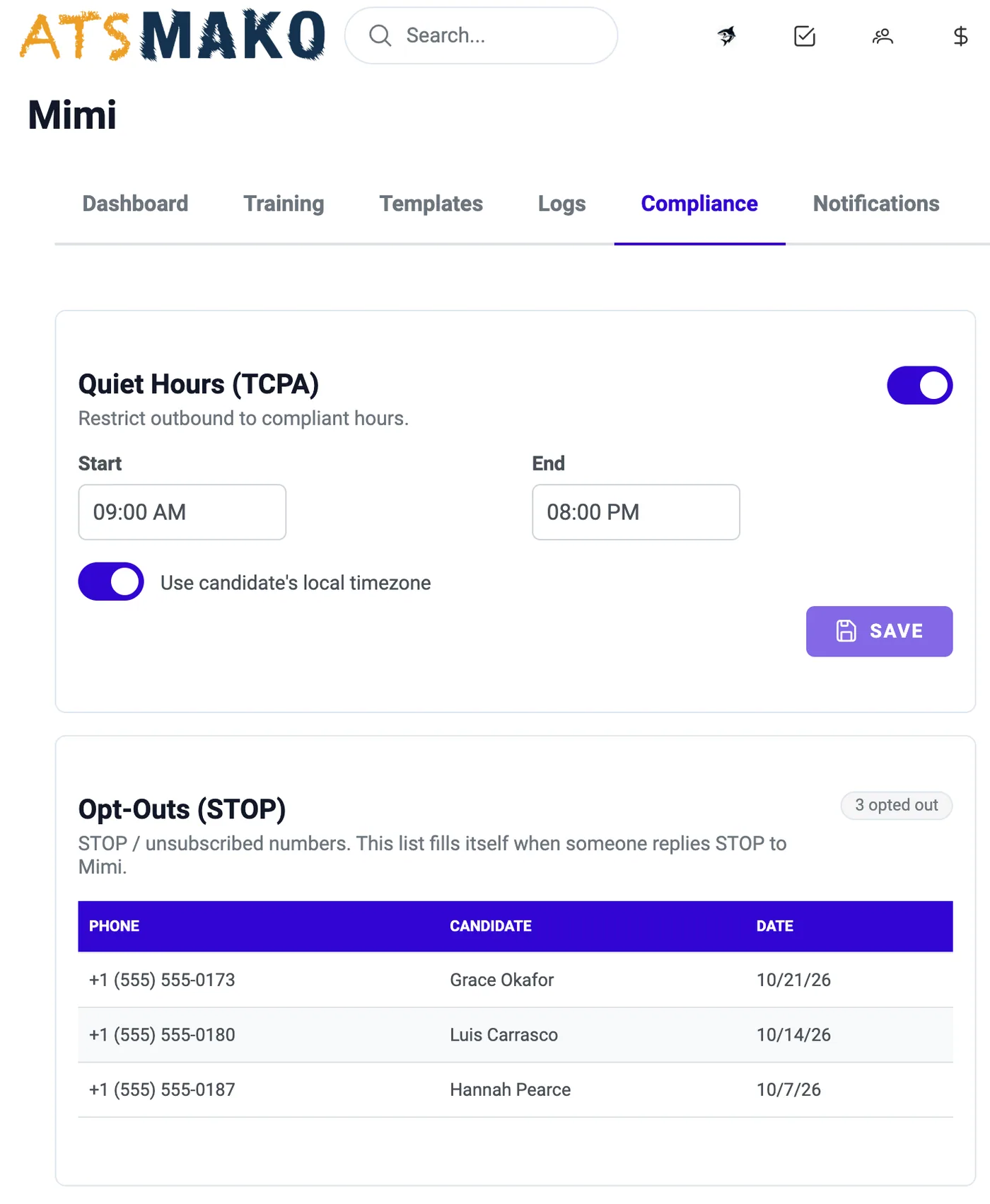
Quiet hours, frequency caps, STOP opt-outs, and do-not-contact lists are enforced automatically before every text. If any check fails, the text is not sent (or is tried again later).
- Quiet hours default to 9:00 AM to 8:00 PM on the applicant's own clock, worked out from their ZIP code, state, or area code. Even with the rule off, texts never go out before 8:00 AM or after 9:00 PM.
- Frequency caps default to 3 texts per day, 10 per week, and a 4-hour cool-down between texts. All three are editable.
- STOP, UNSUBSCRIBE, “remove me”, “leave me alone”, and similar replies add the person to the opt-out list automatically. This is always on.
- The do-not-contact list holds numbers you add by hand (phone, candidate, reason). The office-wide Do Not Call register, shared with Voice Dialing and Native AI, is respected too.
Tell the right people when an applicant reaches a stage.
Choose a sub-status, press Add, type the email addresses of the people to notify, and press Save changes. When an applicant reaches that status, each person gets an email such as “Alex Brown reached 1st Interview”, with a link to the applicants page.
- Up to 20 addresses per sub-status.
- Notification emails go out only while Mimi is switched on for your office.
- Notifications are optional. Without them, Mimi still texts, follows up, and logs as usual.
Six tabs, one job each.
Find them under Admin › Configuration › Mimi.
| Tab | What it does | Good to know |
|---|---|---|
| Dashboard | Choose “When should Mimi start?”, switch her on, and read six tiles for the last 30 days (Messages Sent, Replies Received, Response Rate, Total Candidates, Interviews, Interviews Attended) and the funnel Engaged › Replied › Qualified › Scheduled › Attended › Hired. | She cannot be switched on until a start sub-status is chosen. “Qualified” is the applicant's Qualified flag in ATS Mako, and “Hired” means the applicant has since become an employee. |
| Training | Press “Learn” to read past template-based texts, see which wording got replies at each message stage, and review suggested improvements. | Nothing changes until you approve. Each suggestion card has Update in Templates / Save to Templates, or Dismiss. |
| Templates | Preview, edit, or remove the templates Mimi uses, grouped by category, each with a Response Likelihood badge. | Messages run 1 to 1,600 characters. A template that cannot be filled in completely for an applicant is not sent. |
| Logs | Every applicant Mimi has texted, with message count, last activity, outcome, and the full conversation as chat bubbles. | Administrators only. |
| Compliance | Quiet hours, frequency caps, STOP opt-outs, and the do-not-contact list. | The office-wide Do Not Call register is always respected. |
| Notifications | Email chosen people when an applicant reaches a sub-status. | Up to 20 addresses per sub-status, sent only while Mimi is on. |
What Mimi does with each kind of reply.
Mimi reads replies within about a minute. She only reads them: she never writes the answer.
| The applicant says | What Mimi does | What you see |
|---|---|---|
| STOP, UNSUBSCRIBE, “remove me”, “leave me alone” | Adds the person to the opt-out list and never texts them again. | Outcome: Opted out |
| “No” or “not interested” | Closes the conversation. | Outcome: Declined |
| “Yes” or “I'm free Thursday” | Sends one holding reply telling the applicant that someone from your company is following up to set a time. | Flagged Needs attention |
| A question, a reschedule request, or anything unclear | Leaves it for a person to answer. | Flagged Needs attention |
| “C” or “yes” after a reminder | Marks the conversation Confirmed. | A Confirmed marker |
| No answer at all | Follows up after 24 hours and again after another 48 hours, then closes the conversation after a further 72 hours. | Outcome: No response |
Before you switch her on.
Six steps, in this order.
| Step | What to do |
|---|---|
| 1 | Fill in Settings › My Company: company name, phone, recruiting email, website, and business description. |
| 2 | Make sure your office has an SMS provider and number, and that the applicants you want texted have a job posting and a valid mobile number. |
| 3 | Open Mimi › Templates and review the Outreach, Follow Up, and Reminder templates. |
| 4 | Open Compliance and review quiet hours and frequency caps. |
| 5 | Optionally add Notifications for your team. |
| 6 | On the Dashboard, choose “When should Mimi start?”, then switch “Mimi is active” on. |
Everything in Mimi AI Recruiter.
Starts at the sub-status you choose
Pick where Mimi should begin, then switch her on. She texts applicants as they reach that sub-status, as long as they have a valid US/Canada mobile number, are not blocked or marked duplicate, and were updated in the last 14 days. Switching her on never texts an old backlog.
Follows up, then lets go
The first text uses your best-performing Outreach template that can be completely filled in. If the applicant stays silent, she follows up after 24 hours and again after another 48 hours. After a further 72 hours with no answer, the conversation closes as No response. Any reply stops the chasing.
Reads the replies
Within about a minute, Mimi reads a reply. A STOP-type message opts the person out, and “No” or “not interested” closes the conversation as Declined. A “yes” gets one holding reply and a Needs attention flag. A question, a reschedule request, or anything unclear is flagged for a person.
Reminders before the interview
A recruiter books the interview in the usual way. Mimi notices within about a minute and marks the conversation 1st or 2nd interview scheduled. She texts 24 hours before and again 1 hour before, asking the applicant to reply “C” to confirm.
Your templates, your words
Mimi never improvises. Every text is one of your templates, and every new office starts with countless ready-made ones. The Training tab suggests better wording from past messages, and nothing changes until you approve it.
Texting rules enforced for you
Before every text Mimi checks quiet hours, frequency caps, STOP opt-outs, your do-not-contact list, and the office-wide Do Not Call register. If a check fails, the text is not sent.
Rules built into every text.
Mimi works from a fixed playbook, and these limits are part of it.
Your templates only
The AI that reads replies only understands them (opt-out, decline, confirm, reschedule, question, availability, interested). It never writes the texts. Everything sent is your own template.
Off until you say so
Mimi is off by default and cannot be switched on until you choose a start sub-status. She never texts an old backlog: applicants must have been updated in the last 14 days.
Seven checks before every text
In order: she is on, the applicant is eligible, the number is valid, the number is on no stop list, quiet hours allow it, the frequency caps allow it, and a template can be filled in completely. If any check fails, the text is not sent (or is tried again later).
STOP is honored automatically
A STOP-type reply adds the person to the opt-out list, and Mimi never texts them again. The opt-out rule is always on.
One message, sent once
Every message is recorded before it is sent and can only be sent once, so a glitch cannot produce a duplicate text.
People take over when it matters
Questions, reschedule requests, and unclear replies are flagged Needs attention and left for a person. A recruiter, not Mimi, books the interview.
Rules and limits at a glance.
What Mimi does, how fast, and where she stops.
Your rules still apply.
Mimi enforces the settings you choose before every text. You remain responsible for your own consent practices, message content, and the laws that apply to you. Mimi sends real text messages, so if you are trying her out, use test numbers, not real applicants' numbers.
- Who is texted
- Applicants who reach your start sub-status, with a valid US/Canada mobile number, not blocked or marked duplicate, and updated in the last 14 days.
- First text
- Your best-performing Outreach template that can be completely filled in.
- Follow-ups
- After 24 hours, then after another 48 hours. After a further 72 hours with no answer, the conversation closes as No response.
- Reading replies
- Within about a minute.
- Reminders
- 24 hours and 1 hour before the interview, asking the applicant to reply “C”. A reminder inside the cool-down of an earlier text can be skipped.
- Quiet hours
- Default 9:00 AM to 8:00 PM in the applicant's time zone. Never before 8:00 AM or after 9:00 PM, even with the rule off.
- Frequency caps
- Default 3 per day, 10 per week, and a 4-hour cool-down. Editable.
- Templates
- Countless ready-made templates in every new office. Messages run 1 to 1,600 characters.
- Training
- “Learn” reads the last 365 days of template-based messages, at most once every 24 hours. A message needs at least 20 sends to be suggested, with at most three suggestions per stage.
- Speed
- At most 10 new applicants started per minute per office, and never more than 60 messages a minute in total.
- Notifications
- Up to 20 addresses per sub-status, sent only while Mimi is switched on.
- Dashboard window
- The six KPI tiles cover the last 30 days.
From busywork to a hiring engine.
The old way
- Text new applicants one by one and keep track of who needs a second nudge.
- Wonder which applicants never answered and which ones asked a question.
- Remind each applicant about their interview by hand.
With ATS Mako
- Mimi sends the first text, follows up after 24 and 48 hours, and closes a silent conversation as No response after a further 72 hours.
- Logs show every conversation with its outcome and flag the ones that need a person.
- Mimi texts a reminder 24 hours and 1 hour before the interview and asks the applicant to reply “C” to confirm.
Related features
Mimi AI Recruiter FAQ
Does Mimi book the interview herself?
No. Mimi opens the conversation, keeps it warm, and reminds the applicant, but she does not pick a time herself. A recruiter (or the applicant's own scheduling link) books the interview in the usual way. Mimi notices within about a minute, marks the conversation 1st interview scheduled or 2nd interview scheduled, and sends the reminders.
Does the AI write the texts?
No. The AI that reads replies only understands them (opt-out, decline, confirm, reschedule, question, availability, interested). It never writes the texts. Everything sent is one of your own templates, filled in with real details. If a template cannot be filled in completely for an applicant, it is not sent.
Which applicants does Mimi text?
Applicants who reach the sub-status you chose, who have a valid US/Canada mobile number, who are not blocked or marked duplicate, and who were updated in the last 14 days. That last rule means switching Mimi on never texts an old backlog. Mimi is off by default and cannot be switched on until a start sub-status is chosen.
What happens when an applicant says yes, or asks a question?
A “yes” or “I'm free Thursday” gets one holding reply telling the applicant that someone from your company is following up to set a time, and the conversation is flagged Needs attention. A question, a reschedule request, or anything unclear is flagged Needs attention and left for a person to answer. Flagged conversations show in the Logs tab, where the “Only the ones that need attention” switch builds your daily to-do list.
Can she text applicants at night or too often?
Quiet hours default to 9:00 AM to 8:00 PM on the applicant's own clock, worked out from their ZIP code, state, or area code. Even if you turn that rule off, texts never go out before 8:00 AM or after 9:00 PM. Frequency caps default to 3 texts per day, 10 per week, and a 4-hour cool-down between texts, and you can edit them.
What happens if an applicant replies STOP?
When an applicant replies STOP, UNSUBSCRIBE, “remove me”, “leave me alone”, or similar, they are added to the opt-out list automatically and Mimi never texts them again. This is always on. Numbers on your do-not-contact list and on the office-wide Do Not Call register, which is shared with Voice Dialing and Native AI, are also respected.
Does Mimi make our texting TCPA compliant?
Mimi enforces the settings you choose before every text: quiet hours, frequency caps, STOP opt-outs, and do-not-contact lists. Those controls support your compliance work but do not replace it. You remain responsible for your own consent practices, message content, and the rules that apply to you.
Build a faster, smarter hiring engine.
Start your 30-day free trial — no setup fees, no contracts. Or see ATS Mako in action.
30-day free trial · No setup fees · No long-term contracts