

Skip to content
ATS Mako
Recruiter Workflow Automation

Set the trigger. We handle the rest.

Build trigger-based SMS and email sequences that update notes, move sub-statuses, and follow up automatically - so your recruiters close candidates instead of chasing them.

No setup fees. No long-term contracts. Guided onboarding included.

The problem with manual follow-up

Most candidates are lost in the gaps, not the interviews

Every recruiter knows the drill: send the outreach, remember to follow up, chase the no-shows, update the notes, move the card. Do it once and it is fine. Do it across hundreds of candidates a week and the manual work becomes the bottleneck. Recruiter workflow automation replaces that repetitive labor with triggers - rules that run the follow-up, update the record, and move the pipeline forward on their own.

Five trigger types

The building blocks of an automated recruiter workflow

Every automated sequence is built from a handful of trigger types. Combine them and your pipeline runs itself between the moments that actually need a human.

01

Status-Triggered Sequences

A candidate moves to a new stage and the whole follow-up chain fires on its own. Move an applicant to Screening and the screening SMS goes out. Move them to Interview and the scheduling link, reminders, and prep notes queue automatically. In ATS Mako you set the trigger against a status or sub-status change once, and every candidate who hits that stage gets the exact same on-brand sequence - no recruiter remembering to send it.
02

Time-Triggered Follow-Up

Most candidates are lost in the gap between touches, not in the interview. Time triggers close that gap. Wait 24 hours after an application with no reply, then send a nudge. Wait two days after an interview, then send a status update. ATS Mako queues these delays automatically and holds anything that would land outside business hours, so your pipeline keeps moving while you sleep and no candidate goes cold from silence.

03

Action-Triggered Branching

The best workflows react to what the candidate actually does. If they open the email but do not reply, send an SMS. If they click the scheduling link but do not book, send a reminder. If they reply, alert the recruiter instantly. ATS Mako watches opens, link clicks, replies, and SMS delivery in real time and branches the sequence based on behavior - conditional logic that adapts instead of blasting everyone the same message.

04

Automated Notes and Sub-Status Updates

Modern Workflow Automation is not only about outbound messages - it is about keeping the record clean without repetitive manual work. ATS Mako can automate notes, triggers, and sub-status updates so workflows keep moving on their own. Configure default notes and smart triggers to standardize communication across teams, and use default sub-status settings to keep refreshed applicants organized with clearer identification. The pipeline updates itself as candidates progress.

05

Calendar-Triggered Reminders

Interviews get missed when reminders depend on a recruiter having time to send them. Calendar triggers tie automation to the schedule itself. When an interview is booked, ATS Mako can queue a confirmation, a day-before reminder, and an hour-before nudge - each pulling live merge fields like the interview time and the recruiter name - so both the candidate and your team show up prepared. Set the trigger. We handle the rest.

Manual vs automated

What changes when the workflow runs itself

The same hiring moments, handled two ways. One depends on a recruiter remembering. The other happens automatically, every time.

Hiring moment

New application

Manual

A recruiter has to notice the application, tag it, and write the first outreach. Applications submitted overnight sit untouched until morning.

Automated

A status trigger fires the instant the applicant record is created - first-touch SMS or email sent, source and job posting matched, sub-status set automatically.

Hiring moment

No reply after first touch

Manual

The recruiter has to remember who has not answered and manually chase each one, usually from memory or a spreadsheet.

Automated

A time trigger detects no reply after 24 hours and sends a follow-up. An action trigger switches channels to SMS if the email went unopened.

Hiring moment

Moving to interview

Manual

The recruiter drags the card, then separately sends the scheduling link, then sets a reminder to check if it was booked.

Automated

The status change to Interview triggers the scheduling link, reminders, and prep notes as one sequence - and updates the sub-status without a second click.

Hiring moment

Keeping notes current

Manual

Notes are written by hand when someone has a spare minute, so records drift out of date and teams communicate inconsistently.

Automated

Default notes and smart triggers standardize communication across teams and log activity automatically as candidates move through the pipeline.

Hiring moment

Re-engaging old applicants

Manual

Refreshed or reactivated applicants get lost among older records with no clear way to tell them apart.

Automated

Default sub-status settings keep refreshed applicants organized with clearer identification, so re-engagement campaigns target the right people.

Hiring moment

Tracking what worked

Manual

Engagement lives in a rep's inbox and phone. No shared view of opens, clicks, or replies across the team.

Automated

Real-time engagement tracking logs every open, click, reply, and delivery receipt to a timestamped activity feed the whole team can see.

Build it in five steps

How to build an automated recruiter workflow

A repeatable blueprint for turning a manual pipeline into a self-running one. Map it once, and it works for every candidate after.

  1. 01 Map

    Map your stages and triggers

    Start with the pipeline you already run: Applied, Screening, Interview, Offer, Hired. For each stage, decide what should happen automatically when a candidate lands there. This is your trigger map - the blueprint every sequence is built from.

  2. 02 Template

    Build the message library

    Write the SMS and email your triggers will send using dynamic merge fields like the first name, position, and interview time. Lockable legal and EEO sections stay protected, and updating a template once deploys the change everywhere it is used.

  3. 03 Trigger

    Attach triggers to each stage

    Wire status, time, action, and calendar triggers to the stages you mapped. A move to Screening fires the screening sequence. A 24-hour no-reply fires a nudge. An unopened email branches to SMS. Set it once and it runs for every candidate.

  4. 04 Branch

    Add conditional logic

    Layer in behavior-based branches so the sequence adapts. Opened but no reply, send SMS. Clicked but no booking, send a reminder. Replied, alert the recruiter instantly. The workflow reacts to real engagement instead of blasting everyone the same message.

  5. 05 Measure

    Watch, refine, repeat

    Real-time engagement tracking shows which triggers land and which stall. Refine timing, wording, and channel with a full timestamped activity feed on every candidate profile. Tighten the sequences and the pipeline keeps getting faster.

Modern Workflow Automation

Keep the pipeline moving without repetitive work

ATS Mako's Modern Workflow Automation goes beyond messaging. It keeps your records current and your teams aligned while the pipeline runs.

  • Automate notes, triggers, and sub-status updates to keep workflows moving without repetitive manual work.

  • Standardize communication across teams with configurable default notes and smart triggers.

  • Keep refreshed applicants organized with clearer identification and default sub-status settings.

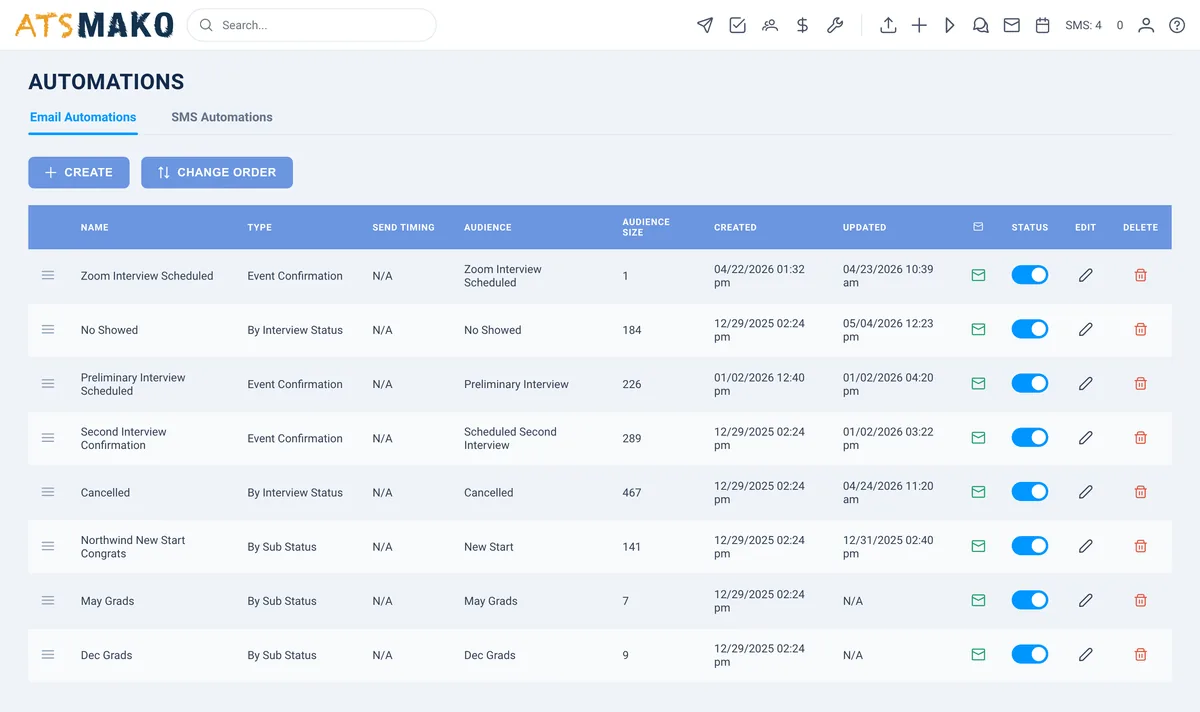
ATS Mako automation builder showing trigger-based recruiter workflow sequences

Automate fast, stay compliant

Speed does not mean cutting corners. Outbound SMS in the US is regulated under the TCPA: texts need lawful prior consent and a clear opt-out like "Reply STOP to unsubscribe." ATS Mako captures consent at the point of application, honors STOP opt-outs automatically, and enforces business-hours quiet windows so time-triggered messages only release inside the approved window. Email sequences keep automatic unsubscribe handling intact under CAN-SPAM, and lockable template sections protect your legal and EEO language so no automation can strip it.

Questions, answered

Recruiter workflow automation FAQ

What is recruiter workflow automation?

Recruiter workflow automation is the practice of using trigger-based rules to run repetitive hiring tasks without manual effort. Instead of a recruiter remembering to send a follow-up, update a note, or move a candidate forward, the system does it automatically when a defined event occurs - a status change, a time delay, a candidate action, or a calendar event. In ATS Mako, this covers automated SMS and email sequences, automated notes, and automated sub-status updates, so recruiters spend their time closing candidates instead of chasing them.

How do I automate workflows in an ATS?

You automate workflows in an ATS by attaching triggers to the stages of your pipeline. First, map each stage and decide what should happen when a candidate enters it. Next, build a template library for the SMS and email those triggers will send. Then wire status, time, action, and calendar triggers to each stage, and add conditional branches based on candidate behavior. ATS Mako lets you configure default notes and smart triggers once, then applies them to every candidate automatically - set the trigger and the platform handles the rest.

What kinds of triggers can I use?

ATS Mako supports status triggers (fire when a candidate moves to a new stage or sub-status), time triggers (fire after a set delay, such as 24 hours with no reply), action triggers (fire based on candidate behavior like opens, link clicks, and replies), and calendar triggers (fire around scheduled interviews). You can combine them with conditional logic so a sequence branches by channel and behavior instead of sending everyone the same message.

Will automation make my outreach feel robotic?

No - done well, automation makes outreach feel faster and more personal. Dynamic merge fields insert the candidate's first name, the position, and the interview time so each message reads as one-to-one. Action-triggered branching means candidates only get messages relevant to what they actually did. And a centralized two-way conversational inbox keeps every reply in one place, so the moment a candidate responds, a real recruiter picks up the thread.

Does workflow automation stay compliant with SMS and email rules?

Yes. Outbound SMS in the US is regulated under the TCPA, which requires lawful prior consent and a clear opt-out. ATS Mako captures consent at the point of application, honors STOP opt-outs automatically, and enforces business-hours quiet windows so time-triggered messages release only inside the approved window. Email sequences keep automatic unsubscribe handling intact under CAN-SPAM, and lockable template sections protect legal and EEO language so it is never stripped by an automation.

How does this connect to the rest of the ATS Mako platform?

Workflow automation is built on the same unified platform as everything else. Triggered sequences run through the same communication engine that powers automated SMS and email, feed the same real-time engagement tracking, and update the same applicant records your team works from. Learn more in the guides on automated engagement workflows and email automation sequences, or start a 30-day free trial and build your first triggered sequence today.

One platform. Every hire.

Stop chasing. Start closing.

Build your first triggered sequence today and let ATS Mako run the follow-up while your recruiters do what only they can - close candidates.

Designed for speed. Built for scale. No setup fees, no long-term contracts.