
A customizable ATS your admin can actually change
Stages, fields, forms, roles, templates and triggers - configured in minutes through the interface. No code, no release cycle, and no support ticket to rename a stage.
30-day free trial. Build your real configuration before you migrate anything.
This is the screen an admin changes
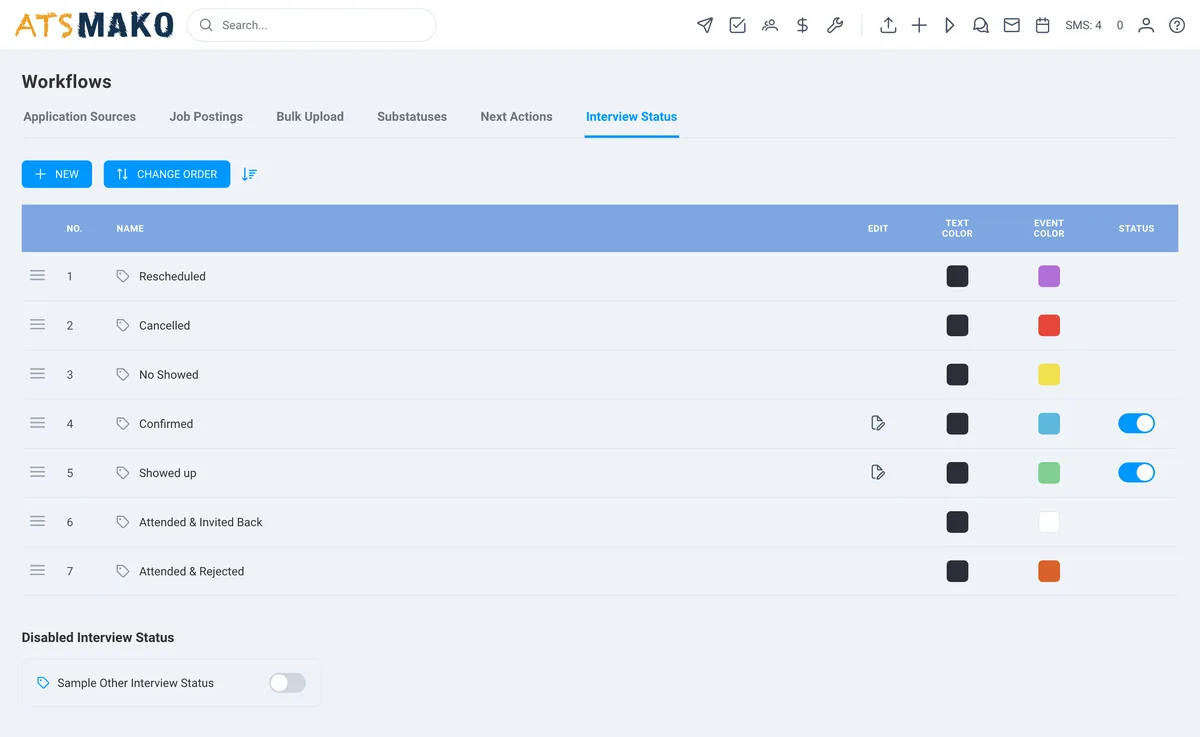
Every ATS says configurable. The question is who has to do the configuring.
Buyers rarely worry that a platform cannot be customised. They worry about what it takes: a six-month implementation, a paid administrator, or a support ticket every time a process changes.
That distinction matters more than the feature list, because it decides whether your system keeps matching your process a year from now. Teams that cannot change their ATS quietly stop trying - and start working around it in spreadsheets and group chats, which is where your data goes to disappear.
Eight things an admin changes without help
Pipeline stages
Rename, reorder, add and remove the stages a candidate moves through, per requisition type. A warehouse req and an executive search do not need the same pipeline, and neither should be forced into the other.
Custom fields
Add the fields your process depends on - certifications, shift availability, licence expiry, clearance level, client code - and make them searchable and reportable rather than buried in a note.
Application forms
Build the questions candidates answer, per job. Add knockout questions that disqualify automatically so your recruiters never open a record that was never eligible.
Roles and permissions
Define who sees and does what, scoped by location, brand or business unit. A branch manager sees their pipeline; a regional director sees the roll-up.
Message templates
Own your SMS and email templates with merge fields, versioned per role, brand or location - so the wording is consistent without being centrally bottlenecked.
Automation triggers
Set the rule once: on stage change, on status, on time elapsed, on a date approaching. The system fires the follow-up, the reminder or the alert without anyone remembering to.
Dashboards and reports
Build the views each role actually needs - a recruiter cares about today's pipeline, a director cares about time-to-fill by location.
Branding
Logo, colours and domain across the candidate portal, application, messaging and offers. Configuration, not a professional services engagement.
The same platform, shaped three ways
Configurability is easy to claim and hard to picture. Here is what it looks like as concrete setups for three very different operations.
Healthcare staffing agency
Custom fields for licence type, state and expiry date. An automation that fires 60, 30 and 7 days before a credential lapses, texting the clinician and alerting the account manager. A pipeline with a compliance-verification stage that a candidate cannot pass without documents attached.
→ Credential expiry stops being something a person has to remember.
Warehouse hiring 200 people a month
An application form with knockout questions on shift availability, transport and lifting requirement. Ranking weighted to distance and availability. A short three-stage pipeline, because a fourteen-stage process is why hourly candidates drop out. Bulk actions to advance or reject a whole filtered segment at once.
→ The overnight pile is triaged before anyone logs in.
Franchise system, 40 locations
Location-scoped roles so each franchisee sees only their own candidates, with a corporate roll-up view across all of them. Templates and brand assets set centrally, with local managers able to post and hire without waiting on head office.
→ Local autonomy without losing central consistency.
Configuration vs customisation
These are different kinds of work on different timelines, and vendors blur them. Knowing which side of the line your requirement sits on is worth more than any demo.
Configuration: your admin, minutes
Stages, fields, forms, roles, templates, triggers, dashboards and branding. No code, no ticket, no release cycle. If changing a stage name requires a support request, that is not a customisable ATS.
API: your developer, a project
Custom integrations, bespoke data flows into a warehouse, or logic that reaches outside the hiring process. Documented API and webhook events make this possible - it is simply a different kind of work, on a different timeline.
Flexible without being fragile
Role-based access control
Configurability without permissions is a liability. Scope who can change what - and who can see what - by role, location or business unit.
Nothing is silently destructive
Renaming a stage does not orphan the candidates in it. Adding a field does not invalidate existing records. Configuration should be reversible.
Test before you commit
Use the 30-day free trial to model your real process end to end before migrating anything. Configure it the way you would run it, then put a live requisition through.
Configuration questions, answered.
Can we rename and reorder pipeline stages ourselves?
Yes. Stages are admin-configurable - rename, reorder, add and remove them, with different pipelines for different requisition types. This is deliberately self-serve: the moment changing a stage name requires a support ticket, teams stop adapting the system to their process and start adapting their process to the system.
Can we add custom fields, and are they searchable?
Yes. Add the fields your process actually runs on - certifications, shift availability, licence expiry, clearance, client codes - and they become searchable and reportable rather than sitting in free-text notes where no filter can reach them. That last part is the point: a custom field that cannot be searched or reported on is just a more organised note.
Is this a customisable ATS for UK and international spellings too?
Yes - customisable and customizable are the same product. More usefully: the platform supports multi-location configuration, so international teams can run location-scoped permissions, templates and pipelines while leadership keeps a consolidated view.
Do we need a developer to configure it?
No. Everything on this page - stages, fields, forms, roles, templates, automation triggers, dashboards and branding - is configured by an admin through the interface. A developer is only needed if you want a custom integration, which is what the API is for.
Can different locations or brands have different configurations?
Yes. Roles and permissions can be scoped by location, brand or business unit, with templates and branding applied per unit and a roll-up view for regional and leadership roles. Franchise systems and multi-brand operators are a core use case rather than an edge case.
Can we test a configuration before committing to it?
Yes, and you should. The 30-day free trial exists for exactly this: build your real pipeline, add your real fields, set your real triggers, and run one live requisition through it. A configuration that survives one real hiring cycle tells you far more than any demo.
Related capabilities
Configure it the way you actually hire.
30-day free trial. Build your real pipeline, fields and triggers, then run one live requisition through it.
30-day free trial · No setup fees · No long-term contracts